
Running a cab business involves far more than accepting bookings and assigning drivers. Every trip creates a chain of operational tasks: customer details must be captured, drivers and vehicles assigned, journey changes communicated, completed trips verified, charges calculated, invoices generated and payments tracked.
When these activities are handled across spreadsheets, messaging apps, emails and separate accounting records, even a relatively small fleet can create a significant administrative workload.
Cab business automation can simplify this process by connecting each stage of the journey. Instead of repeatedly entering the same information, operators can build workflows that move booking data through dispatch, trip completion, billing and payment management.
The objective is straightforward: reduce repetitive administration while giving the business greater visibility and control.
Why Cab Businesses Need Connected Operations
Many operational problems in a growing cab company are not caused by a lack of information. They happen because information is fragmented.
A dispatcher may have the latest pickup details while the driver has an older version. The accounts team may be waiting for confirmation that a trip was completed. A customer may have changed the destination by phone, but the change was never reflected in the billing record.
These small disconnects become expensive when multiplied across dozens or hundreds of bookings.
A centralized cab management system creates a continuous flow of information. Booking details can follow the trip through every operational stage, giving dispatchers, drivers and accounts teams access to the information relevant to their responsibilities.
Map the Entire Booking-to-Payment Workflow
Before automating anything, understand how a booking currently moves through the business.
Start with the initial customer enquiry and follow it until payment is received. Depending on the operation, the workflow might include:
Booking received → customer details recorded → fare or quotation confirmed → driver assigned → customer notified → trip completed → final charges confirmed → invoice generated → payment recorded.
The exact sequence will differ between cab businesses.
An airport transfer company may need flight details and waiting-time rules. A corporate transportation provider may require account numbers, purchase orders and monthly invoicing. A local taxi operator may prioritize rapid dispatch and immediate payment.
The important part is identifying every point where information is manually copied, delayed or potentially lost.
Capture Every Booking in One System
Automation becomes difficult when bookings originate in multiple places but never reach a central record.
Customers might book through phone calls, emails, online forms or repeat-account requests. Regardless of where an enquiry begins, confirmed booking information should ultimately enter the same operational system.
A structured booking record can contain details such as:
- Customer and passenger information
- Pickup and destination addresses
- Date and pickup time
- Vehicle requirements
- Passenger count
- Special instructions
- Pricing information
- Payment method
- Corporate account details
- Driver assignment
- Booking status
Centralizing this information gives the business a reliable record that can support every subsequent step.
More importantly, employees no longer need to search through emails, messages and spreadsheets to determine which information is current.
Automate Booking Confirmations
Once a booking is confirmed, routine customer communication should not require the dispatcher to manually type the same information every time.
A cab booking system can trigger confirmations automatically using the booking information already stored in the system.
Customers can receive relevant information such as pickup time, pickup location, booking reference and other trip details without creating another manual task for the operations team.
Automated confirmations also help establish a consistent customer experience. Whether the company processes ten bookings or several hundred, every passenger can receive the appropriate information at the correct stage of the journey.
Make Driver Assignment More Efficient
Driver allocation is one of the most important parts of daily cab operations.
Without an organized system, dispatchers may rely heavily on phone calls, chat groups or personal knowledge of which drivers are working.
Automation can make this process more structured.
Dispatch teams can use current operational information to determine which drivers and vehicles are available for upcoming duties. Once a driver is assigned, the relevant trip information can become available without requiring the dispatcher to manually relay every detail.
This can reduce unnecessary communication while giving dispatchers better visibility over outstanding and assigned work.
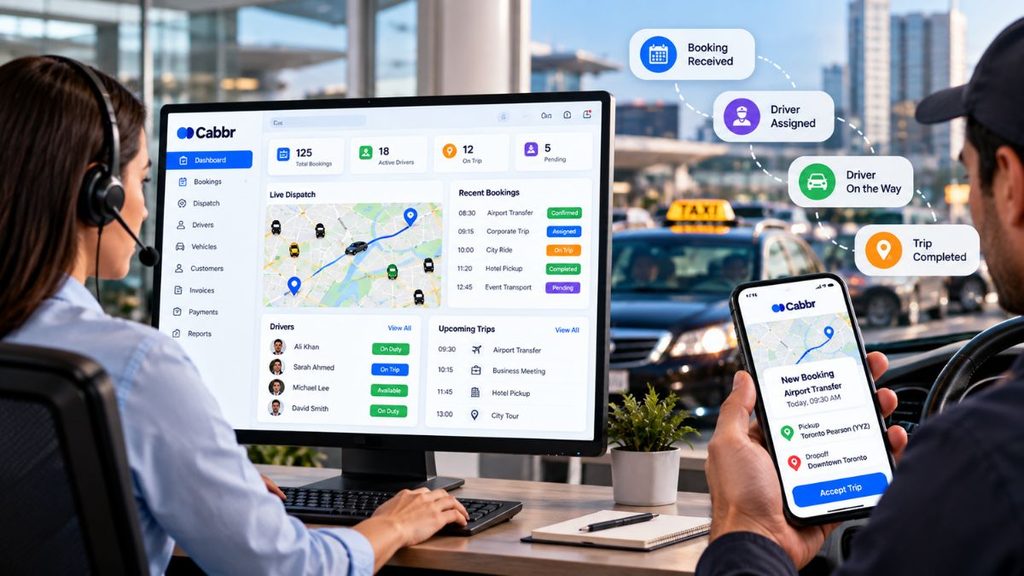
Keep Booking and Duty Changes Connected
Transportation operations change constantly.
Customers move pickup times. Flights arrive late. Drivers become unavailable. Vehicles need replacing. Destinations change.
The problem is not that changes occur. The operational risk comes when those changes are updated in one place but not everywhere else.
If a passenger changes a pickup from 2:00 PM to 3:00 PM, that information should not exist only inside a text conversation.
The booking record should be updated so that dispatch, the assigned driver and any downstream billing process are working from the same information.
A connected workflow creates a clearer operational history and reduces the chance that outdated details will continue circulating through the business.
Record Trip Completion Accurately
A completed journey is an important operational milestone because it can trigger the next stage: billing.
However, businesses need more than a simple “completed” status.
Depending on the type of service, final trip information may include waiting time, additional stops, parking charges, tolls, mileage adjustments or other approved expenses.
Recording these details immediately after the trip helps create a more reliable billable record.
It also reduces the need for accounts staff to contact drivers or dispatchers days later to reconstruct what happened.
Turn Completed Trips Into Billable Records
One of the biggest opportunities for cab business automation is connecting operations directly with billing.
In a manual environment, accounts teams may receive completed-trip information through spreadsheets, emails or handwritten notes. They then have to verify the information before creating an invoice.
That process creates unnecessary duplication.
When trip records and billing workflows are connected, completed duties can move toward invoicing using information already captured during the booking and journey.
Customer details, agreed rates, journey information and approved additional charges can all contribute to the final billing record.
This shortens the distance between completing the service and getting paid.
Automate Cab Invoicing
Creating invoices manually becomes increasingly difficult as booking volume grows.
This is particularly important for cab businesses serving corporate accounts, hotels, healthcare organizations, schools or other customers that may receive multiple journeys on one invoice.
Cab invoicing software can help operators organize billable trips according to customer requirements and generate invoices using recorded booking and trip data.
Depending on the account arrangement, invoices might be created individually, weekly, monthly or according to another billing cycle.
Automation does not eliminate the need for financial oversight. Instead, it reduces repetitive data entry so the accounts team can concentrate on reviewing exceptions and maintaining accurate financial records.
Track Payments and Outstanding Invoices
Generating an invoice is only part of the revenue cycle.
Operators also need visibility into what has been paid and what remains outstanding.
When payment tracking is disconnected from operations, managers may know that the fleet is busy without having a clear picture of how much revenue has actually been collected.
A connected system can provide visibility into invoice status, received payments and outstanding balances.
This is especially valuable for businesses with a significant volume of account customers.
Rather than relying on memory or manually checking multiple records, the team can identify unpaid invoices and take appropriate follow-up action.
Use Automated Alerts for Important Exceptions
Automation is not only about performing tasks automatically. It can also help people identify situations that require attention.
For example, an operator may want visibility when:
- A booking remains unassigned
- A driver has not acknowledged a duty
- Important trip information is incomplete
- A completed trip has not reached billing
- An invoice remains outstanding
- A booking has been modified
- A payment requires follow-up
This creates an exception-based operating model.
Instead of employees repeatedly checking every booking to find problems, the system can help surface the records that require human attention.
That allows the team to spend less time monitoring routine activity and more time resolving genuine exceptions.
Reduce Duplicate Data Entry
Repeated data entry is one of the clearest signs that a workflow could benefit from automation.
If a customer’s name, address, journey details and price are entered during booking, the same information should not need to be typed again for dispatch and then entered a third time for invoicing.
Every manual transfer creates another opportunity for an error.
Connected cab management software allows information captured at the beginning of the booking lifecycle to remain useful throughout the rest of the process.
The goal should be to capture accurate information once, update it when necessary and allow authorized teams to use it throughout the operational lifecycle.
Keep Automation Flexible
Not every booking follows the standard process.
A corporate client may have unique billing instructions. An airport pickup may require additional waiting time. A passenger may request a last-minute route change. A driver may report an unexpected charge.
That means effective automation should support exceptions rather than forcing every journey through an inflexible workflow.
Routine activities can be automated while unusual situations are flagged for human review.
This balance is important because transportation remains a service business. Technology should make employees more effective without preventing them from responding appropriately when circumstances change.
Automate Your Cab Business in Stages
Trying to automate every department at once can make implementation unnecessarily complicated.
A more practical approach is to begin with one high-friction workflow.
For example, an operator might start by connecting booking and dispatch. Once that process is working consistently, the company can connect trip completion and billing. Payment tracking and reporting can follow afterward.
A phased approach gives employees time to adapt and allows management to identify problems before automation is expanded.
It also provides measurable operational improvements earlier in the implementation process.
Measure Whether Automation Is Actually Working
Successful automation should produce measurable operational improvements.
Cab operators can monitor indicators such as:
- Time required to process bookings
- Number of unassigned duties
- Booking or dispatch errors
- Time between trip completion and invoicing
- Outstanding invoice value
- Number of manual data-entry steps
- Driver and vehicle utilization
- Customer response times
These metrics help management determine whether technology is genuinely improving the business rather than simply adding another piece of software.
How Cabbr Can Support a More Connected Cab Operation
Cabbr can help cab businesses bring important operational processes into a more connected environment.
Instead of managing bookings, customer information, driver activity and billing as separate administrative tasks, operators can build workflows that provide better visibility across the booking lifecycle.
For a growing cab business, this becomes increasingly important.
More bookings should create more revenue—not a proportional increase in paperwork, duplicated information and administrative pressure.
The right cab management software helps operators establish repeatable processes that can support growth while maintaining control over day-to-day operations.
Final Thoughts
Cab business automation is ultimately about removing unnecessary work between the moment a customer books a journey and the moment the business receives payment.
The strongest workflows connect booking, dispatch, drivers, trip completion, billing and payment information rather than treating them as isolated processes.
Automation cannot replace experienced dispatchers, reliable drivers or strong customer service. What it can do is reduce the repetitive administrative work surrounding those people.
For cab operators evaluating technology, the most important question is not how many features a platform offers.
It is how effectively the system removes everyday operational friction and helps the business manage more bookings without creating more complexity.
Frequently Asked Questions
What is cab business automation?
Cab business automation involves using software to reduce repetitive administrative tasks across processes such as bookings, dispatch, driver assignments, customer communication, trip completion, invoicing and payment tracking.
Can a small cab company benefit from automation?
Yes. Smaller operators can benefit because owners and dispatchers often handle several responsibilities simultaneously. Automating repetitive activities can reduce administrative workload and help the team maintain more consistent records.
Which cab processes should be automated first?
Start with repetitive processes that consume significant staff time or frequently create errors. Booking entry, confirmations, driver assignments, trip completion, invoicing and payment follow-ups are common areas to evaluate.
Should every cab business process be automated?
No. Routine and rule-based activities are generally better candidates for automation. Exceptions, sensitive customer situations and decisions involving incomplete or unusual information may still require human review.
How does automation help cab invoicing?
Automation can connect completed trip information with billing records, reducing the need to manually re-enter customer, journey and pricing information before generating invoices.
What should cab operators measure after implementing automation?
Useful metrics include booking processing time, unassigned duties, billing delays, outstanding payments, manual data entry, driver and vehicle utilization, and the frequency of operational errors.
Can automation help a cab business scale?
Automation can make growth easier to manage by reducing repetitive administrative work. When bookings, dispatch and billing processes are connected, an operator may be able to handle higher booking volumes without increasing administrative workload at the same rate.
Cabbr Note: This article provides general business information. Tax, accounting and regulatory requirements can vary by location and business model. Operators should consult appropriate professional advisers regarding specific compliance requirements.