
What Is Cab CRM Software? Features, Benefits and Use Cases
Managing a cab business involves much more than accepting ride bookings and assigning drivers. Every trip requires coordination between customers, vehicles, drivers, dispatch teams, and billing staff. When these activities are managed through spreadsheets, phone calls, messaging applications, and disconnected records, even a small operational mistake can affect customer satisfaction and business profitability.
Cab CRM software helps taxi operators, fleet managers, and travel agencies organize customer information, manage bookings, coordinate drivers, monitor vehicle availability, and streamline billing through a centralized system. It reduces dependence on manual processes and gives business owners better visibility into daily operations.
For a small taxi company, this might mean avoiding double bookings and keeping customer details accessible. For a growing fleet operator, it could mean coordinating dozens of vehicles, tracking pending payments, and maintaining accurate trip records. For a travel agency, it may involve managing airport transfers, outstation journeys, corporate transportation, and repeat customers without constantly switching between different tools.
However, not every cab CRM platform offers the same capabilities. Some focus primarily on customer relationships, while others combine customer management with booking operations, dispatch, fleet administration, and invoicing.
Understanding these differences is essential before investing in software.
This guide explains what cab CRM software is, how it works, its important features, practical business benefits, common use cases, implementation considerations, and how to choose a suitable solution for your transportation business.
What Is Cab CRM Software?
Cab CRM software is a customer relationship management system designed for taxi companies, cab operators, travel agencies, and other passenger transportation businesses. It helps organize customer records and connects them with operational activities such as ride bookings, driver assignments, vehicle management, trip histories, and billing.
Unlike a traditional CRM that mainly tracks sales leads and customer interactions, a cab-specific CRM addresses the operational requirements of transportation businesses.
For example, when a customer requests an airport pickup, the system can help the booking team record the journey, identify an available vehicle, assign a suitable driver, and maintain the information needed to prepare an invoice.
The exact level of automation depends on the software being used.
Cab CRM Software Definition
Cab CRM software is a specialized business management solution that centralizes customer information, trip bookings, driver coordination, vehicle availability, and billing workflows for cab and taxi operators.
Its primary purpose is to improve operational organization, reduce repetitive administrative work, and support more consistent customer service.
A well-structured cab CRM creates a connected record of the customer journey, from the initial booking inquiry to trip completion and payment reconciliation.
Why Is Cab CRM Different From a Regular CRM?
A general CRM typically helps businesses manage leads, customer communications, sales opportunities, and follow-up activities.
A cab CRM must address an additional layer of operational complexity.
Consider a corporate customer who books transportation for five employees traveling to different locations. A conventional CRM may record the customer’s contact information and booking request. A cab-specific system can also support the operational records required to coordinate multiple trips, vehicles, drivers, schedules, and invoices.
This operational connection makes specialized cab software more relevant for transportation businesses.
The distinction is not simply about storing customer data. It is about connecting customer relationships with the services being delivered.
Why Cab and Taxi Businesses Need CRM Software
Many transportation businesses begin with straightforward operating processes.
A customer calls to book a taxi. The office records the details in a notebook or spreadsheet. A dispatcher contacts a driver, confirms the trip, and communicates the arrangement to the customer.
This approach may work when the business manages only a few bookings each day.
Problems emerge as booking volumes increase, additional drivers join the fleet, and customers begin requesting more complex services.
1. Booking Information Becomes Difficult to Manage
A cab business may receive reservations through telephone calls, messaging applications, email inquiries, travel agents, and corporate customers.
When bookings arrive through multiple channels, staff members must manually consolidate the information.
A pickup time may be entered incorrectly. A customer might change the destination without the update reaching the dispatcher. Two employees may accidentally assign the same vehicle to different trips.
These problems often result from disconnected information rather than a lack of employee effort.
Cab booking management software helps create a consistent process for recording and maintaining reservations.
2. Driver Coordination Requires Constant Communication
Dispatchers must know which drivers are available, which vehicles are assigned, and when ongoing trips are expected to finish.
Without organized records, these decisions often depend on repeated phone calls.
This becomes especially difficult during early morning airport transfers, peak business hours, wedding transportation, and holiday travel.
A centralized system allows authorized staff to work from more consistent booking and assignment information.
3. Vehicle Availability Is Not Always Clear
A vehicle may be unavailable because it is completing a trip, undergoing maintenance, or reserved for a future booking.
If these details are not recorded properly, staff may promise a vehicle that cannot actually serve the customer.
Vehicle availability management is therefore an important part of cab operations.
It helps operators make more realistic booking commitments and reduces scheduling conflicts.
4. Billing Errors Affect Cash Flow
Transportation billing can involve fixed fares, hourly packages, outstation charges, waiting charges, parking fees, tolls, and customer-specific commercial arrangements.
When these details are collected manually, invoices may be delayed or prepared with incorrect information.
Corporate customers may also require consolidated billing for multiple journeys.
A cab CRM with billing and invoicing capabilities can help connect trip records with the invoicing process, reducing repeated data entry.
5. Customer Information Gets Scattered
Repeat customers are valuable to transportation businesses, particularly those offering airport transfers, employee transportation, and corporate travel.
However, customer details often remain distributed across employee phones, spreadsheets, and email conversations.
When information is centralized, authorized employees can retrieve relevant customer records more easily and provide a more consistent booking experience.
How Does Cab CRM Software Work?
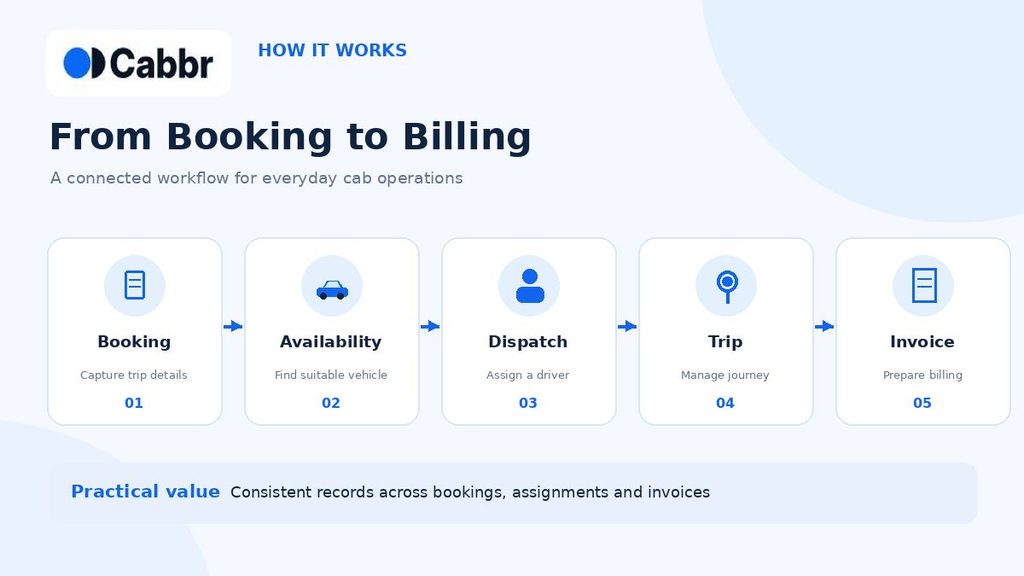
Cab CRM software generally follows the operational journey of a transportation booking, connecting customer information with the activities required to deliver the trip.
The precise workflow depends on the platform and the business model.
Step 1: Customer Inquiry and Booking Creation
The process begins when a customer requests transportation.
The booking team records essential information such as the customer’s name, contact details, pickup location, destination, travel date, pickup time, vehicle requirements, and any special instructions.
For an airport transfer, the operator may also record flight details or terminal information.
For a corporate booking, additional information may include the employee’s department, billing account, or authorized booking contact.
The objective is to capture complete and consistent booking information before dispatch.
Step 2: Checking Vehicle Availability
Once the reservation is recorded, the team identifies a suitable vehicle.
Availability depends on several factors, including the vehicle category, existing reservations, operational status, and expected return time.
For example, a customer traveling with six passengers and several large bags may require a different vehicle from someone requesting a short city transfer.
A vehicle availability system helps staff avoid making decisions based only on assumptions.
Step 3: Driver Assignment and Dispatch
After selecting a vehicle, the booking is assigned to an appropriate driver.
The dispatcher must consider the driver’s availability, operating area, shift schedule, and suitability for the journey.
In systems with integrated dispatch capabilities, booking and assignment records can be maintained within the same operational workflow.
Some advanced platforms also support driver notifications, mobile applications, and automated dispatch rules. These capabilities should be verified individually rather than assumed to be standard across all cab CRM products.
Step 4: Trip Management
During the journey, the business may need to record operational updates such as trip commencement, completion, changes in destination, or additional charges.
The information required depends on the service type.
An hourly rental may need start and end times, while an outstation trip may require distance and package details.
A structured trip record creates a more reliable foundation for billing and customer support.
Step 5: Billing and Invoicing
After the journey, the billing team uses the applicable trip information to prepare the customer invoice.
Depending on the software, trip details may flow directly into the billing process, reducing the need to enter the same information again.
The team can then review charges, apply the relevant tax treatment, and issue an invoice according to the business’s procedures.
Step 6: Customer Record Maintenance
Completed journeys can contribute to the customer’s booking history.
This allows the business to review previous services, address billing questions, and handle future reservations more efficiently.
Over time, organized customer records can support stronger account management and repeat-business opportunities.
Key Features of Cab CRM Software
The most useful cab CRM features are those that solve recurring operational problems.
A business should evaluate software based on the activities it performs daily, not simply on the number of features advertised.
1. Centralized Cab Booking Management
Booking management is one of the most important functions of a cab business management system.
It provides a structured way to create, review, modify, and maintain transportation reservations.
A useful booking system should support essential details such as travel dates, pickup and drop-off locations, customer information, vehicle requirements, and booking status.
For businesses managing different transportation services, the system should also accommodate relevant booking categories.
These might include local transfers, airport pickups, outstation journeys, hourly rentals, and corporate transportation.
Practical Example
Suppose a travel agency receives 25 airport transfer requests for the following morning.
Instead of maintaining separate messages and spreadsheets, staff can organize the reservations in one booking workflow.
They can review departure times, identify overlapping requirements, and coordinate vehicle assignments more systematically.
The benefit is not simply faster data entry. It is improved visibility into upcoming operational commitments.
2. Customer Relationship Management
Customer management is the foundation of CRM software.
For transportation businesses, a customer profile may include contact information, company details, billing information, booking history, and relevant service preferences.
The specific information collected should be limited to what is necessary for legitimate business purposes.
How Customer Records Improve Service
Imagine a corporate client regularly books airport transportation for visiting executives.
With organized records, the booking team can retrieve previous trip information and identify the correct billing account.
This reduces repeated questions and makes it easier to maintain continuity when different employees handle the account.
Customer management is particularly useful for companies serving repeat passengers, travel agencies, hotels, and business clients.
3. Driver Management
Driver management helps operators organize the people responsible for delivering transportation services.
Depending on the system, driver records may include names, contact information, assigned vehicles, availability, and operational status.
More advanced driver management systems may support document tracking, shift schedules, attendance, or performance reporting.
These advanced capabilities are not universal and should be confirmed during software evaluation.
Why Driver Management Matters
A cab operator managing 20 drivers needs more than a contact list.
The business must understand which drivers can accept assignments and how driver availability affects future bookings.
Organized driver records reduce dependence on informal communication and make daily coordination more manageable.
4. Fleet Management
Fleet management provides a structured view of the vehicles used by a transportation business.
A fleet record may contain the vehicle registration number, category, capacity, assigned driver, and operational status.
Some specialized fleet management products also support maintenance schedules, insurance records, permit information, and operating cost tracking.
Whether these functions are included in a particular cab CRM must be verified.
Example of Fleet Management in Practice
Consider a taxi operator with 15 sedans, five SUVs, and three larger passenger vehicles.
Different customers require different vehicle categories.
A centralized fleet record helps employees identify the appropriate vehicle type and maintain accurate vehicle information.
It also makes it easier to avoid relying on outdated spreadsheets.
5. Vehicle Availability Management
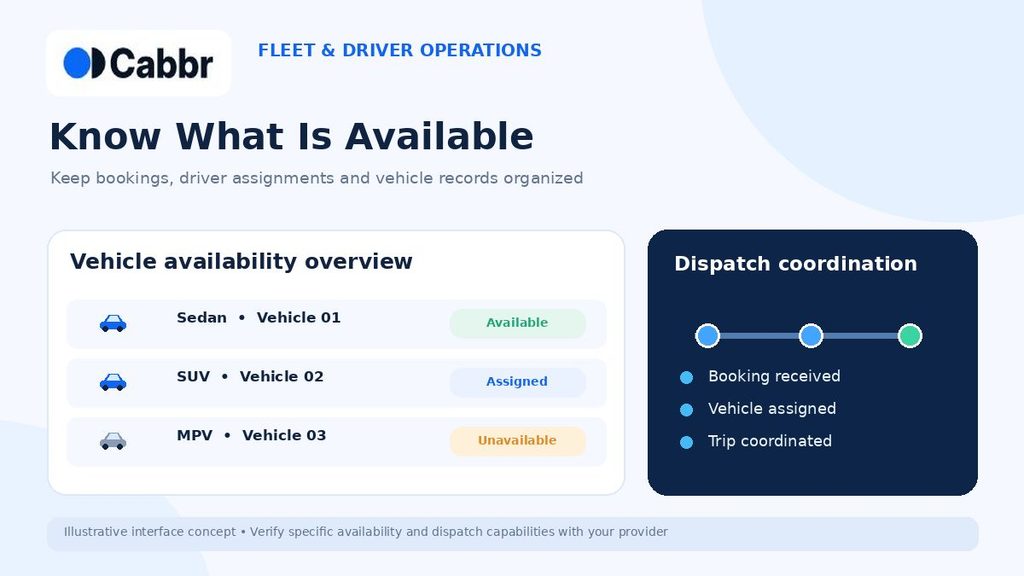
Vehicle availability is closely related to fleet management but serves a distinct purpose.
Fleet management maintains information about vehicles. Availability management helps determine whether a vehicle can be assigned to a particular booking.
This distinction is important.
A vehicle may be registered in the fleet but unavailable for service because it is already booked.
A reliable availability process considers both current assignments and future reservations.
Business Benefit
Suppose two customers request the same SUV for overlapping time slots.
If availability records are not updated consistently, both bookings could be confirmed.
A centralized availability system helps staff identify scheduling conflicts before making commitments.
6. Dispatch Management
Dispatch management connects confirmed bookings with drivers and vehicles.
It helps operations teams coordinate who will perform each trip and when the service should begin.
For businesses handling numerous daily journeys, dispatch is a critical operational function.
A structured dispatch workflow reduces confusion about assignments and helps maintain a clear relationship between bookings and the resources allocated to them.
Manual Versus Automated Dispatch
Manual dispatch requires an employee to select and assign a driver.
Automated dispatch uses predefined rules or system logic to assist with assignments.
Neither approach is automatically superior for every business.
A small operator may prefer manual control, while a high-volume operation may benefit from more advanced dispatch functionality.
The appropriate choice depends on booking volume, operational complexity, and the software’s actual capabilities.
7. Billing and Invoicing
Billing is often one of the most time-consuming administrative activities in a cab business.
Different trips may follow different pricing arrangements.
A local transfer might have a fixed charge. An hourly rental may depend on time and distance. An outstation journey may include a package rate and additional charges.
Corporate customers may have negotiated pricing or monthly billing arrangements.
Cab billing software helps businesses organize the information required to prepare accurate invoices.
Booking-to-Billing Automation
One valuable capability is connecting booking records with billing.
When relevant trip details are already recorded, the billing team may not need to re-enter all the information manually.
For example, a completed corporate trip can provide the customer account, journey details, and applicable service information required for invoicing.
The exact level of automation varies by platform.
Businesses should also verify support for applicable GST requirements, invoice formats, and financial workflows before selecting a solution.
8. Trip History and Operational Records
Trip records help businesses answer practical questions.
Which vehicle served a customer? Who was assigned to the journey? What service was requested? Which charges were applied?
These details are important when investigating customer complaints, reviewing invoices, or confirming completed services.
A searchable trip history can also reduce the time employees spend locating old information.
However, operators should establish appropriate retention periods and access controls for personal and business records.
9. Reports and Business Visibility
Some cab management systems provide operational reports or dashboards.
Depending on the product, these may cover booking volumes, completed trips, outstanding invoices, vehicle utilization, or customer activity.
Reporting capabilities should be assessed separately because they differ significantly between platforms.
A business does not necessarily need dozens of reports.
It needs accurate information that supports decisions.
For example, knowing how many bookings were completed is useful. Understanding how many were cancelled, rescheduled, or left unassigned may be even more valuable for improving operations.
10. User Access and Operational Control
As a cab company grows, multiple employees may need access to its management software.
Booking agents, dispatchers, billing staff, and managers perform different responsibilities.
A suitable system should be evaluated for user permissions, authentication, activity records, and access controls.
These capabilities help businesses protect customer information and reduce unnecessary access to sensitive records.
Security requirements become particularly important when a company handles corporate transportation, employee travel details, or customer billing information.
Benefits of Cab CRM Software for Transportation Businesses
The benefits of cab CRM software depend on how well it matches the company’s processes and how consistently employees use it.
Software does not automatically solve operational problems. It provides tools that can make well-designed processes more reliable.
Reduced Administrative Work
Manual transportation operations often involve entering the same information repeatedly.
A booking may first appear in a message, then a spreadsheet, then a dispatch register, and finally an invoice.
When these processes are connected, businesses can reduce duplicate data entry.
This allows employees to spend more time coordinating trips and serving customers.
Better Booking Accuracy
Centralized booking records reduce the risk of information being lost between employees.
Staff can refer to the same reservation details rather than relying on separate messages.
This is especially useful when customers change pickup times, destinations, or vehicle requirements.
Improved Fleet Utilization
Vehicle utilization refers to how effectively a business uses its available fleet.
A company may own 20 vehicles but struggle to coordinate them efficiently.
Better visibility into bookings and vehicle availability can support more informed allocation decisions.
However, improved utilization also depends on customer demand, geographic coverage, scheduling practices, and driver availability.
More Consistent Customer Experience
Customers expect transportation providers to understand their requirements and deliver the service they booked.
A centralized system helps staff retrieve relevant information and maintain consistent records.
This is valuable when the same customer books repeatedly or communicates with different employees.
Faster Billing Preparation
When trip records and billing workflows are connected, invoice preparation can become more efficient.
Staff may spend less time collecting trip information from drivers or searching through booking registers.
The result can be a more organized billing process, although actual time savings depend on the software and operating procedures.
Improved Operational Accountability
A structured system makes it easier to determine which bookings are pending, assigned, completed, or awaiting billing.
Clear records help managers identify unresolved work and follow up with the appropriate team members.
Better Support for Business Growth
A business handling ten bookings per day has different operational requirements from one handling 100.
As volumes increase, informal processes become harder to manage.
A centralized system can provide a more consistent operating structure as the company expands its fleet, workforce, and customer base.
Cab CRM Software Use Cases Across Different Business Models
Cab CRM software is not limited to traditional city taxi services.
Different transportation businesses can use it in different ways.
Use Case 1: Small Taxi Operators
A small taxi business may operate five to ten vehicles with a limited administrative team.
The owner often handles customer calls, driver coordination, and billing.
The main challenge is keeping everything organized without hiring additional office staff.
A cab CRM can help centralize booking information, customer records, vehicle availability, and invoicing.
For this type of business, simplicity may be more important than advanced functionality.
The best solution is often one that employees can use consistently without extensive training.
Use Case 2: Growing Cab Fleets
As a fleet expands, the number of possible scheduling conflicts increases.
More vehicles mean more drivers, assignments, maintenance interruptions, and customer requests.
A growing operator needs reliable information about which resources are available and how bookings are distributed.
Cab fleet management software can support this coordination by organizing vehicle records and connecting them with operational workflows.
The business may also need additional user access, reporting, and stronger administrative controls.
Use Case 3: Travel Agencies
Travel agencies frequently arrange transportation as part of broader travel services.
A single agency may coordinate airport transfers, sightseeing trips, outstation journeys, and hotel pickups.
Bookings may be received days or weeks before the actual journey.
The challenge is maintaining accurate reservations while coordinating multiple vehicles and customers.
A cab CRM for travel agencies helps organize customer details, travel schedules, and transportation arrangements.
For agencies working with outside vehicle suppliers, it is also important to verify whether the selected software supports the required supplier coordination and billing workflows.
Use Case 4: Corporate Transportation Providers
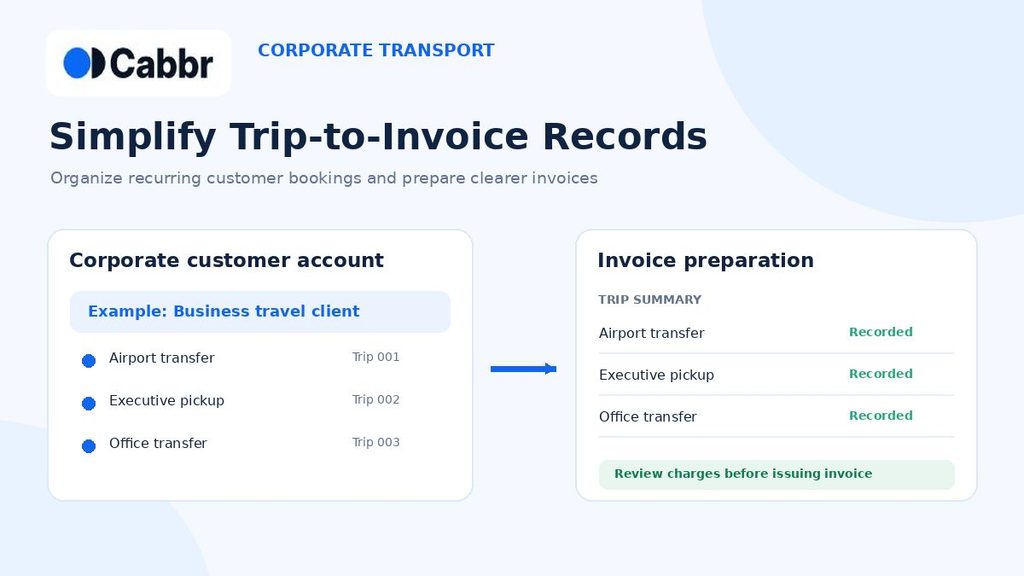
Corporate transportation often involves recurring bookings, multiple passengers, and centralized billing.
A company may arrange daily employee pickups, executive transfers, or transportation for visiting clients.
The transportation provider must maintain consistent records for both the corporate account and individual trips.
CRM software can help organize these relationships and connect booking activity with billing information.
Operators should assess whether the platform can handle their specific account structures, approval processes, and invoice requirements.
Use Case 5: Airport Transfer Businesses
Airport transportation requires precise scheduling.
Customers may book early morning pickups, late-night arrivals, or transfers involving multiple passengers.
A booking error can create significant inconvenience because flight schedules and travel commitments are time-sensitive.
A centralized booking system helps operators maintain accurate pickup information, customer contacts, and vehicle assignments.
Businesses requiring live flight monitoring or automated flight-based rescheduling should verify those capabilities separately.
Use Case 6: Outstation Cab Services
Outstation transportation has different operational requirements from short city journeys.
Trips may last several hours or multiple days.
The business may need to manage vehicle categories, driver availability, package pricing, and additional journey expenses.
A cab CRM can help organize the reservation and the associated billing information.
The operator should confirm whether the software supports its specific pricing model, including one-way trips, round trips, and multi-day bookings.
Use Case 7: Hotel and Hospitality Transportation
Hotels may coordinate airport pickups, local transfers, and sightseeing transportation for guests.
A transportation partner serving several hotels needs accurate records of each reservation and the organization responsible for the booking.
Customer details, pickup instructions, and billing arrangements must remain clear.
A centralized management system can reduce confusion between hotel contacts, transportation staff, and drivers.
Use Case 8: Employee Transportation Services
Employee transportation providers may manage recurring schedules for offices, factories, or business parks.
Their operational requirements can involve multiple pickup points, different shifts, and changing passenger volumes.
Basic cab CRM functionality can help organize customer accounts, bookings, vehicles, and driver information.
However, specialized employee transportation functions such as route optimization, passenger attendance, and shift-based routing should not be assumed to be included in every platform.
Businesses with these requirements should evaluate dedicated functionality before purchasing.
Cab CRM Software vs Cab Booking Software vs Fleet Management Software
These terms are often used interchangeably, but they describe different areas of transportation management.
Understanding the differences helps businesses avoid purchasing software that addresses only part of their requirements.
| Software type | Primary purpose | Typical capabilities |
|---|---|---|
| Cab CRM software | Customer and operational relationship management | Customer records, booking history, account coordination, and connected workflows |
| Cab booking software | Reservation management | Booking creation, scheduling, modifications, and booking status |
| Fleet management software | Vehicle administration | Vehicle records, availability, maintenance information, and fleet oversight |
| Cab dispatch software | Trip allocation | Driver assignments, dispatch coordination, and trip status |
| Cab billing software | Financial administration | Trip charges, invoices, billing records, and payment-related workflows |
| Integrated cab management software | Coordinated business operations | Multiple functions connected through a common system |
The categories can overlap substantially.
An integrated cab business management platform may combine CRM, booking management, dispatch, fleet administration, and billing.
For many operators, the practical question is not which category sounds most impressive.
It is whether the software supports the complete workflow the business needs.
What Problems Can Cab CRM Software Solve?
Before selecting a CRM, operators should identify their most expensive or disruptive operational problems.
A software investment is easier to evaluate when it is connected to specific business outcomes.
Problem: Double Bookings
Two employees confirm the same vehicle for overlapping reservations.
Potential solution: Maintain centralized booking and vehicle availability records, with clear procedures for updating assignments.
Problem: Lost Customer Details
Customer information remains in personal messaging accounts or handwritten notes.
Potential solution: Use a centralized customer database accessible to authorized staff.
Problem: Delayed Invoices
The billing team waits for trip details from dispatchers and drivers.
Potential solution: Connect trip records with the invoicing workflow and establish a consistent trip completion process.
Problem: Unclear Driver Assignments
Employees repeatedly contact drivers to confirm who is handling a trip.
Potential solution: Maintain structured assignment records and clear dispatch responsibilities.
Problem: Poor Visibility Into Upcoming Bookings
The owner cannot easily understand the following day’s operational workload.
Potential solution: Use a centralized reservation schedule and review upcoming vehicle requirements.
Problem: Inconsistent Corporate Billing
Trips completed for the same business customer are recorded across multiple files.
Potential solution: Organize reservations under consistent customer accounts and billing records.
The software’s value comes from reducing these recurring sources of friction.
How Cab CRM Software Can Help Reduce Operating Costs
Transportation businesses face several categories of operating expenses.
These include driver compensation, fuel, vehicle maintenance, administration, software, office overhead, and customer service.
Cab CRM software does not directly eliminate most of these expenses.
Its financial contribution generally comes from improving administrative efficiency and supporting better resource coordination.
Reducing Repeated Data Entry
Suppose an operator handles 80 bookings per day.
If employees spend an average of three minutes per booking transferring information between disconnected records, that represents 240 minutes, or four hours, of administrative activity.
If a connected workflow reduces the transfer work to one minute per booking, the time requirement falls to 80 minutes.
Illustrative administrative time calculation
Manual process
4 hr
Per day
Connected process
1 hr 20 min
Per day
2 hr 40 min
Potential daily time saving under these assumptionsHypothetical example, not a measured result or guaranteed software outcome.
The example illustrates why reducing repetitive tasks matters, especially for businesses with substantial booking volumes.
Actual savings depend on existing processes, staff adoption, and the level of integration.
Reducing Preventable Booking Errors
A booking error can lead to additional coordination, customer complaints, or a lost reservation.
Better information management can reduce some preventable errors, although software cannot eliminate human mistakes entirely.
Improving Billing Efficiency
When trip information is organized consistently, billing staff may spend less time locating records and correcting invoices.
This can support more timely invoice issuance and reconciliation.
However, faster invoicing does not guarantee faster customer payment.
Payment terms and collection practices remain important.
Supporting Better Resource Allocation
Knowing which vehicles are available helps dispatchers make more informed assignments.
This can reduce unnecessary coordination and support better scheduling.
Businesses seeking measurable reductions in fuel use or empty vehicle movement may require additional routing and location-based capabilities beyond basic CRM functionality.
How Much Does Cab CRM Software Cost in India?
The cost of cab CRM software varies according to the provider, included modules, number of users, fleet size, implementation requirements, and support arrangements.
There is no single standard price for the Indian market.
Some providers use monthly or annual subscriptions. Others may charge setup fees, offer customized quotations, or price services according to fleet size or user access.
Businesses should compare the complete cost of ownership rather than focusing only on the advertised subscription amount.
Factors That Influence Cab CRM Pricing
Number of users: A business with one administrator may have different licensing requirements from an operation with separate booking, dispatch, billing, and management teams.
Fleet size: Some software providers structure pricing according to the number of vehicles managed.
Included functionality: A basic booking and customer management solution may differ in cost from a platform that includes advanced dispatch, reporting, integrations, and specialized workflows.
Implementation: Data migration, configuration, employee training, and operational setup may involve additional costs.
Support: Businesses should determine whether technical assistance, updates, and ongoing support are included.
Customization: Specialized business requirements can increase implementation complexity and cost.
Questions to Ask Before Accepting a Quotation
Request a written explanation of the total subscription or licensing charges, setup costs, included features, user limits, support arrangements, and cancellation terms.
Also ask whether data can be exported if the business changes software providers.
A low initial price may be less attractive if essential capabilities require expensive add-ons.
Conversely, a costly enterprise platform may be unnecessary for a small taxi operator with straightforward requirements.
The appropriate budget depends on operational value, not simply software complexity.
How to Calculate the ROI of Cab CRM Software
Return on investment helps determine whether a software purchase makes financial sense.
For cab operators, the calculation should focus on measurable operational improvements.
Consider a hypothetical business that spends ₹60,000 annually on CRM software and associated implementation costs allocated to that year.
Suppose the company estimates that the software produces ₹90,000 in annual administrative savings and avoids another ₹30,000 in measurable correction and rework costs.
Its estimated annual benefit is ₹1,20,000.
After subtracting the ₹60,000 annual cost, the net benefit is ₹60,000.
The resulting ROI is 100%.
This is an illustrative calculation, not a typical industry result.
Cab CRM ROI Calculator
Illustrative
Adjust the estimates to evaluate your own cab business.
Annual software and implementation cost (₹)
Annual administrative savings (₹)
Other measurable annual savings (₹)
Estimated annual net benefit
₹60,000
Estimated ROI
100%
Reset example
Assumes all benefits are attributable to the software and are measured over the same annual period. Estimates are not guaranteed outcomes.
When calculating ROI, operators should avoid counting the same benefit twice.
For example, time savings should not be counted as both reduced payroll expense and additional employee productivity unless both outcomes can be demonstrated separately.
A realistic ROI assessment should also consider training time, process changes, and any additional operating costs.
How to Choose the Best Cab CRM Software for Your Business
Selecting the right software requires more than comparing product descriptions.
A platform may offer an impressive feature list but still be difficult to use or poorly suited to a particular transportation business.
The evaluation process should begin with operational requirements.
1. Identify Your Business Model
A local taxi company, travel agency, airport transfer provider, and corporate transportation operator may require different workflows.
Document the types of bookings your business handles and the information needed to complete them.
This becomes the foundation of the software evaluation.
2. Map Your Existing Booking Process
Follow a typical reservation from the initial inquiry through dispatch, trip completion, and invoicing.
Identify where employees repeatedly enter information, wait for confirmation, or correct mistakes.
These are the areas where software improvements may deliver the greatest value.
3. Prioritize Essential Features
Separate essential capabilities from optional enhancements.
For example, a small operator may prioritize booking management, customer records, vehicle availability, and invoicing.
A larger operation may also require advanced reporting, permissions, integrations, and complex dispatch workflows.
Avoid paying for features that do not address a genuine operational requirement.
4. Evaluate Ease of Use
Software adoption is critical.
If employees find the system confusing, they may continue using spreadsheets and personal messages.
This creates duplicate records and undermines the value of the new platform.
During a demonstration, ask employees to perform realistic tasks rather than simply watching a presentation.
5. Test Real Booking Scenarios
A useful software demonstration should include scenarios that reflect actual operations.
Ask the provider to show how the system handles a new airport booking, a last-minute pickup change, an unavailable vehicle, a repeat corporate customer, and invoice preparation.
These examples reveal more than a general feature overview.
6. Review Data Security
Customer information and trip records require appropriate protection.
Ask about user authentication, permissions, data backups, access logging, and data handling practices.
Indian businesses should also consider applicable personal data protection obligations and the privacy expectations of their customers.
7. Understand Support and Training
Even intuitive software requires an adjustment period.
Determine how employees will receive training and what happens when technical issues interrupt operations.
Clarify support channels, service hours, response expectations, and escalation procedures.
8. Confirm Scalability
Consider whether the software can accommodate additional vehicles, users, booking volumes, and business locations.
A platform that works for ten vehicles may not necessarily meet the requirements of a much larger fleet.
Scalability should be evaluated through documented capabilities rather than marketing promises.
9. Compare Total Cost
Review the complete financial commitment, including subscription charges, setup fees, customization, training, and ongoing support.
A practical cost comparison should cover at least the expected initial contract period.
10. Run a Pilot Before Full Adoption
Where possible, test the software with a limited number of users and real operating scenarios.
A pilot helps identify missing features, confusing workflows, and training requirements before the entire company depends on the system.
Cab CRM Software Implementation: A Practical Step-by-Step Plan
Successful implementation requires clear responsibilities and consistent operating procedures.
Even well-designed software can produce unreliable information if employees do not maintain accurate records.
Phase 1: Prepare Existing Data
Review customer lists, vehicle records, driver information, pending bookings, and outstanding billing records.
Remove obvious duplicates and correct inaccurate information.
Migrating disorganized data into a new platform can reproduce existing problems.
Phase 2: Configure Business Workflows
Define how bookings will be created, assigned, updated, completed, and invoiced.
Decide which employees are responsible for each activity.
The software should support a clear operating process rather than becoming another disconnected recordkeeping tool.
Phase 3: Establish User Responsibilities
Assign appropriate access to booking agents, dispatchers, managers, and billing staff.
Employees should understand which records they are expected to maintain.
For example, a dispatcher may be responsible for updating vehicle assignments, while billing staff manage invoice preparation.
Phase 4: Train Employees Using Real Scenarios
Training should reflect daily operations.
Use examples such as airport pickups, customer cancellations, vehicle changes, and corporate invoicing.
Employees should practice handling exceptions, not just routine bookings.
Phase 5: Begin With a Controlled Rollout
Start with a manageable group of bookings or employees.
Monitor data accuracy, staff feedback, and workflow issues.
Once the process becomes reliable, expand usage across the business.
Phase 6: Measure Results
Review operational performance after implementation.
Useful indicators may include booking errors, time spent preparing invoices, unresolved assignments, and administrative workload.
Compare results with the baseline established before adoption.
This helps determine whether the software is producing meaningful improvements.
Common Mistakes to Avoid When Buying Cab CRM Software
One common mistake is choosing software primarily because it offers a large number of features.
Features have little value if they are irrelevant to the business or difficult for employees to use.
Another mistake is failing to involve operational staff in the evaluation.
Owners may focus on reporting and management visibility, while dispatchers and booking agents face the practical challenges of entering reservations and coordinating vehicles.
Both perspectives matter.
Businesses should also avoid assuming that every cab CRM includes GPS tracking, automated customer notifications, online payment collection, mobile driver applications, or route optimization.
These are distinct capabilities that must be confirmed.
A further mistake is migrating inaccurate customer and vehicle records without cleaning them first.
Finally, operators should not expect software alone to fix unclear responsibilities or inconsistent procedures.
Technology supports operational discipline. It does not replace it.
Important KPIs to Track After Implementing Cab CRM Software
A business should evaluate its CRM using operational metrics rather than relying only on employee opinions.
The most relevant key performance indicators depend on the company’s services and goals.
Booking Accuracy Rate
This measures the proportion of bookings completed without preventable administrative errors.
Track issues such as incorrect pickup details, duplicate reservations, or assignment mistakes.
Booking Confirmation Time
Measure the time between receiving a complete booking request and confirming the reservation.
This can help identify delays in checking vehicle availability or coordinating drivers.
Vehicle Utilization Rate
Vehicle utilization can be measured in different ways.
One approach compares revenue-generating vehicle hours with the total vehicle hours available for service.
The business should use a consistent definition and avoid comparing results calculated using different methods.
Invoice Preparation Time
Track the time required to prepare an invoice after the relevant trip details are available.
This is particularly useful for corporate transportation businesses with substantial billing activity.
Invoice Error Rate
Monitor invoices that require correction because of missing information, incorrect charges, or administrative mistakes.
A declining error rate may indicate better data quality and billing processes.
Repeat Customer Rate
Measure the proportion of customers who make additional bookings during a defined period.
This can provide insight into customer retention, although repeat business is influenced by pricing, service quality, demand, and other factors beyond CRM software.
Booking Cancellation Rate
Track cancellations as a percentage of confirmed bookings.
Record cancellation reasons where appropriate.
This helps distinguish customer-driven cancellations from problems involving vehicle availability or operational coordination.
Outstanding Invoice Value
Monitor the amount of invoiced revenue that remains unpaid.
This is a useful financial indicator, although invoice collection may depend on separate accounting and payment processes.
The objective is to select a manageable group of KPIs and review them consistently.
How Cab CRM Software Supports Customer Retention
Customer retention is especially important for transportation businesses serving recurring clients.
A customer who books airport transfers several times a month may generate more long-term value than an occasional passenger.
However, retention depends on reliable service, fair pricing, availability, and communication.
CRM software contributes by improving the organization of customer information.
Maintaining Consistent Customer Records
When authorized employees can access relevant booking history, they can respond more effectively to repeat inquiries.
Customers do not need to explain the same account information repeatedly.
Handling Service Issues
Accurate trip records make it easier to investigate complaints and billing disputes.
A company can review the recorded booking requirements and determine what happened.
This supports a more professional resolution process.
Supporting Corporate Account Relationships
Corporate customers may require consistent invoicing, accurate employee travel records, and reliable service coordination.
Centralized records help account managers understand the services delivered and maintain organized customer relationships.
Reducing Dependence on Individual Employees
When customer information exists only in an employee’s personal records, service continuity becomes difficult if that person is unavailable.
A centralized CRM reduces this dependency and helps maintain organizational knowledge.
Cloud-Based Cab CRM Software vs Traditional Desktop Systems
Cab operators may encounter both cloud-based and locally installed software.
Each approach has different operational considerations.
Cloud-Based Cab CRM
Cloud-based software is generally accessed through an internet connection and hosted infrastructure.
Depending on the product, authorized employees may be able to access the system from different locations.
The provider typically manages aspects of the hosting environment, although security responsibilities remain shared between the provider and the customer.
Businesses should verify availability commitments, backup procedures, data export options, and support arrangements.
Desktop or Locally Hosted Software
Locally installed systems may operate within a company’s own computing environment.
They can offer greater control over certain infrastructure decisions but may require additional responsibility for maintenance, updates, backups, and technical support.
Remote access and integration capabilities depend on the system’s architecture.
Which Option Is Better?
There is no universal answer.
Businesses with distributed teams may find cloud access useful.
Organizations with specialized infrastructure or compliance requirements may evaluate other deployment models.
The decision should consider reliability, connectivity, security, operational access, cost, and the provider’s support capabilities.
Cab CRM Software for Indian Transportation Businesses
India’s transportation market includes a wide variety of operating models.
Small cab owners may manage a few vehicles, while travel agencies and fleet operators coordinate larger networks of drivers and vehicles.
Booking channels, service types, customer expectations, and billing arrangements can vary significantly.
This makes operational flexibility particularly important.
Managing Multiple Booking Channels
Indian cab businesses frequently receive inquiries through phone calls, messaging applications, travel agents, and direct customer relationships.
A centralized booking process helps prevent information from remaining scattered across these channels.
Supporting Local and Outstation Services
Operators may handle short city transfers, airport pickups, full-day rentals, and long-distance journeys.
Each service can have different scheduling and pricing requirements.
Businesses should confirm that their chosen CRM can represent the booking types they actually sell.
Managing Corporate Customers
Corporate transportation can involve multiple passengers, recurring journeys, and centralized invoicing.
Customer account management and organized trip records are particularly valuable for these relationships.
Handling Billing Requirements
Indian operators should assess whether the software supports their invoicing practices and applicable tax requirements.
GST treatment can depend on the nature of the transportation service, supplier arrangements, and other circumstances.
Software-generated invoices should therefore be reviewed for compliance with the business’s actual tax obligations.
Supporting Regional Operations
Businesses operating across multiple cities may need to coordinate vehicles, drivers, and bookings in different locations.
Before purchasing software, they should verify whether it supports the required organizational structure and access permissions.
How Cabbr Supports Cab Business Management
Cabbr is a cab business management software platform designed around the operational needs of cab and taxi businesses.
Its scope includes cab CRM, booking management, dispatch, driver management, fleet management, vehicle availability, customer management, billing, and invoicing.
These functions address several of the common challenges discussed throughout this guide.
For example, a transportation business needs to maintain customer information while also managing the vehicles and drivers required to complete bookings.
Keeping these activities connected can reduce the fragmentation associated with maintaining separate operational records.
Cabbr also addresses the booking-to-billing workflow, an important area for operators seeking to reduce repetitive administrative tasks.
Where Cabbr May Be Relevant
Cabbr may be worth evaluating for cab owners who want more organized booking and customer records, fleet operators coordinating vehicles and drivers, and travel agencies managing transportation reservations.
It may also be relevant to businesses seeking to connect trip operations with billing and invoicing.
The suitability of the platform should be assessed against each company’s actual workflows, booking volumes, staffing arrangements, and invoicing requirements.
Businesses should confirm specific functionality, configuration options, pricing, support, and implementation requirements directly before making a purchasing decision.
The most important consideration is whether the platform can support the daily activities that create the greatest operational burden.
Future Trends in Cab CRM and Taxi Management Software
Transportation management software continues to evolve as operators seek more connected business processes.
Several areas are particularly relevant when considering long-term software requirements.
Greater Integration Between Business Functions
Businesses increasingly benefit when booking, dispatch, customer management, and billing processes share consistent information.
Integrated workflows can reduce the need to transfer records manually between separate systems.
More Accessible Operational Information
Managers need timely information about reservations, assignments, and unresolved administrative tasks.
Systems that make relevant information easier to retrieve can support faster operational decisions.
More Structured Customer Management
As transportation businesses develop recurring commercial relationships, organized customer accounts and booking histories become more important.
CRM functionality can help operators manage these relationships consistently.
Increasing Attention to Data Protection
Transportation businesses handle customer contact information, journey details, and sometimes sensitive commercial records.
Data access controls, secure storage, retention practices, and responsible handling will remain important software evaluation criteria.
Growing Interest in Advanced Automation
Some transportation technology platforms are exploring or offering more advanced capabilities, including automated assignment rules, predictive demand analysis, and intelligent scheduling.
These features may be useful in certain operating environments, but they are not standard capabilities of all cab CRM systems.
Businesses should evaluate such technologies based on demonstrated usefulness rather than assumptions about future benefits.
Frequently Asked Questions About Cab CRM Software
1. What is cab CRM software?
Cab CRM software is a specialized customer and business management system for taxi operators, cab companies, fleet managers, and travel agencies. It helps organize customer information and can connect it with bookings, driver coordination, vehicle availability, and billing workflows.
2. What is the main purpose of cab CRM software?
Its main purpose is to centralize customer and operational information so transportation businesses can manage reservations, coordinate resources, reduce administrative work, and maintain more consistent service records.
3. Is cab CRM software suitable for small taxi businesses?
Yes. Small taxi operators can benefit from organized bookings, customer records, vehicle availability, and invoicing. However, they should choose software that matches their operating scale and budget rather than purchasing unnecessary advanced features.
4. What is the difference between cab CRM and cab booking software?
Cab booking software primarily manages transportation reservations. Cab CRM focuses on customer information and relationships while potentially connecting those records with bookings, dispatch, fleet administration, and billing. Integrated platforms may offer both functions.
5. Can cab CRM software manage drivers and vehicles?
Many cab-specific management systems include driver and vehicle administration. The exact capabilities vary. Operators should verify whether a platform supports their required driver records, vehicle information, availability management, and assignment workflows.
6. Does cab CRM software help with invoicing?
Cab CRM platforms with billing functionality can help connect booking or trip information with invoice preparation. This can reduce repeated data entry and improve record consistency. Tax compliance and specific invoice formats should be verified before implementation.
7. How much does cab CRM software cost in India?
Pricing varies by provider, fleet size, user count, functionality, and implementation requirements. Businesses should request a detailed quotation covering subscription fees, setup, training, support, and any additional charges.
8. Can travel agencies use cab CRM software?
Yes. Travel agencies can use cab CRM software to organize transportation bookings, customer details, vehicle requirements, and billing information. Agencies with external suppliers or complex package arrangements should verify support for those workflows.
9. Does cab CRM software include GPS tracking?
Not necessarily. GPS tracking is a separate capability that some transportation platforms provide through additional modules or integrations. Businesses requiring live vehicle tracking should confirm its availability before purchasing.
10. Can cab CRM software reduce operating costs?
It can help reduce certain administrative costs by limiting duplicate data entry, improving record accuracy, and streamlining workflows. Actual financial savings depend on booking volume, existing processes, implementation quality, and software capabilities.
11. Is cab CRM software useful for corporate transportation?
Yes. Corporate transportation providers can benefit from centralized customer accounts, organized trip records, booking coordination, and invoicing. Requirements such as approval workflows or consolidated billing should be assessed individually.
12. What should I look for in the best cab CRM software?
Prioritize reliable booking management, customer records, vehicle availability, driver coordination, billing capabilities, ease of use, security, support, and reasonable total cost. Test the system using real operational scenarios before making a final decision.
13. Can cab CRM software manage airport and outstation bookings?
Cab management platforms may support these booking categories, but the level of functionality differs. Operators should verify scheduling, vehicle selection, pricing, and trip management requirements for their specific services.
14. How long does it take to implement cab CRM software?
Implementation time depends on the platform, data quality, number of users, workflow complexity, and training requirements. A small operation with clean records may have a simpler rollout than a multi-location fleet requiring extensive configuration.
15. What is the difference between cab CRM software and taxi dispatch software?
Taxi dispatch software primarily coordinates trip assignments between bookings, drivers, and vehicles. Cab CRM manages customer information and related business records. Some integrated platforms combine both capabilities.
16. Is Cabbr a cab CRM software platform?
Cabbr is a cab business management software platform with capabilities covering cab CRM, booking management, dispatch, driver management, fleet management, vehicle availability, customer management, billing, and invoicing. Businesses should evaluate its suitability against their specific operational requirements.
Final Thoughts: Is Cab CRM Software Worth It?
Cab CRM software can be a valuable investment for transportation businesses struggling with scattered booking information, inconsistent vehicle availability records, repetitive administrative tasks, and disconnected billing processes.
Its greatest benefit is not simply digitizing existing paperwork.
The real opportunity is to create a more organized operating process in which customer information, reservations, driver assignments, vehicle records, and billing activities are managed consistently.
For small taxi operators, this can mean better control over daily bookings. For growing fleets, it can support more reliable coordination. For travel agencies and corporate transportation providers, it can help maintain structured customer accounts and service records.
The right software should make essential work easier without introducing unnecessary complexity.
Cabbr offers a relevant option for businesses exploring connected cab CRM, booking, dispatch, fleet, customer management, and invoicing capabilities.
Before choosing any platform, identify the operational problems you need to solve, test the required workflows, assess the total cost, and establish measurable goals.
The best cab CRM software is not necessarily the platform with the longest feature list. It is the one that helps your transportation business manage its bookings, customers, vehicles, drivers, and billing more reliably as it grows.
Learn more: Explore Cabbr’s smart cab management solutions for bookings, driver management, fleet operations, and billing at https://cabbr.in